Docs · How it works · Install · Camera · First night
Using the desk
The desk is the recorder's web page. Open https://<host>:8443 and sign in.
The pictures here are from version 0.2.4 and one real night, 22–23 October, on a roof camera in central Illinois. That night the desk kept 362 events. Click a picture to see it full size.
Along the top are the camera, the night, and whether it is recording now. Pick an older night from the night list. Below that are the tabs: Inbox, Timeline, Sky map, History, Gallery, Cameras, Settings and Help.
Inbox
The inbox is the list of what moved last night. It is grouped by type, in this order: Unidentified, Meteors, Satellites, Planes, Other. Click the minus sign on a group to fold it. The number on the Inbox tab is how many are unidentified.
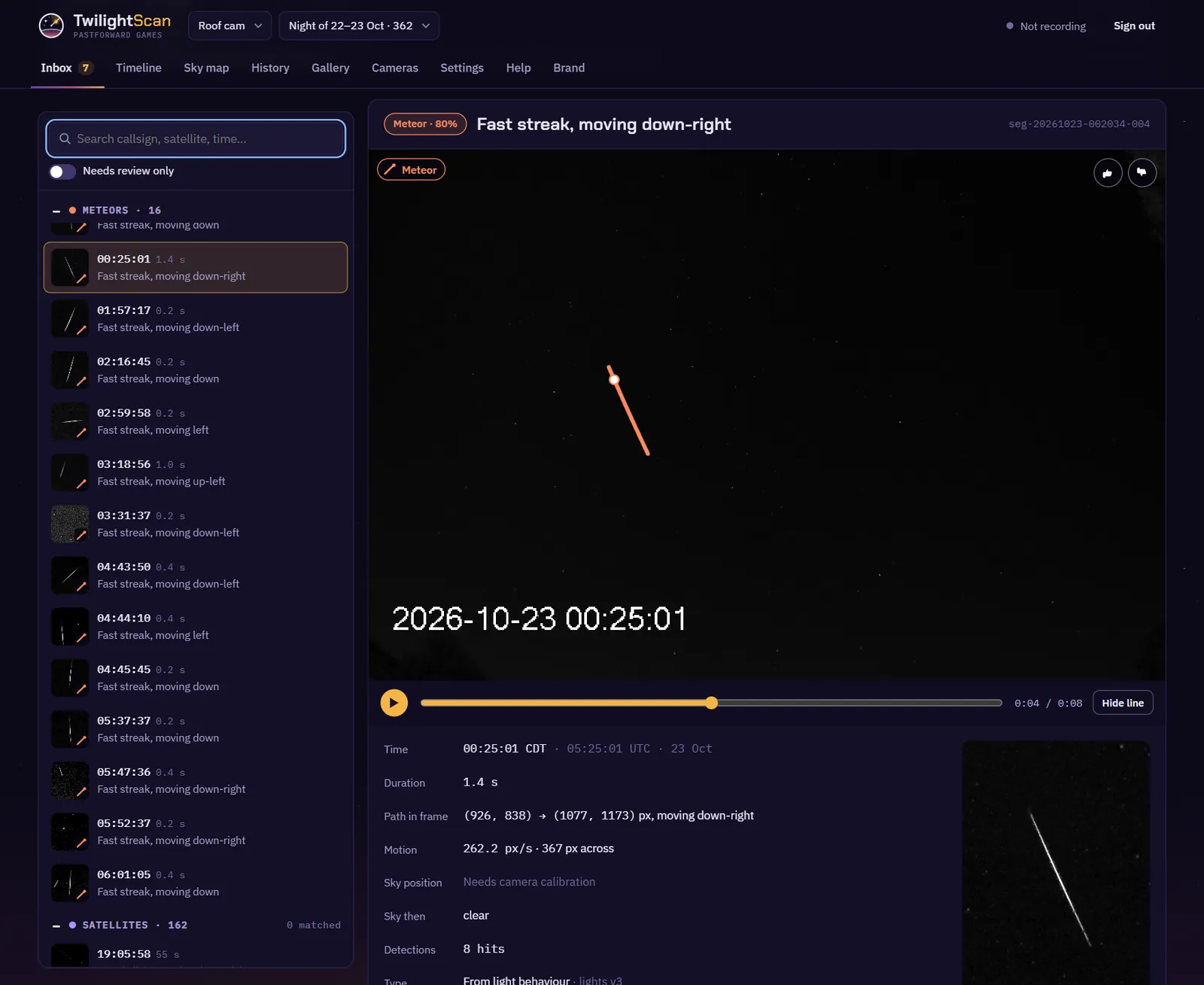
Each row has the time, how long it was in view, and a short description, like "Fast streak, moving down-right". The small picture is the stacked trail. The Planes group shows 60 rows, then a button for the rest.
The clip
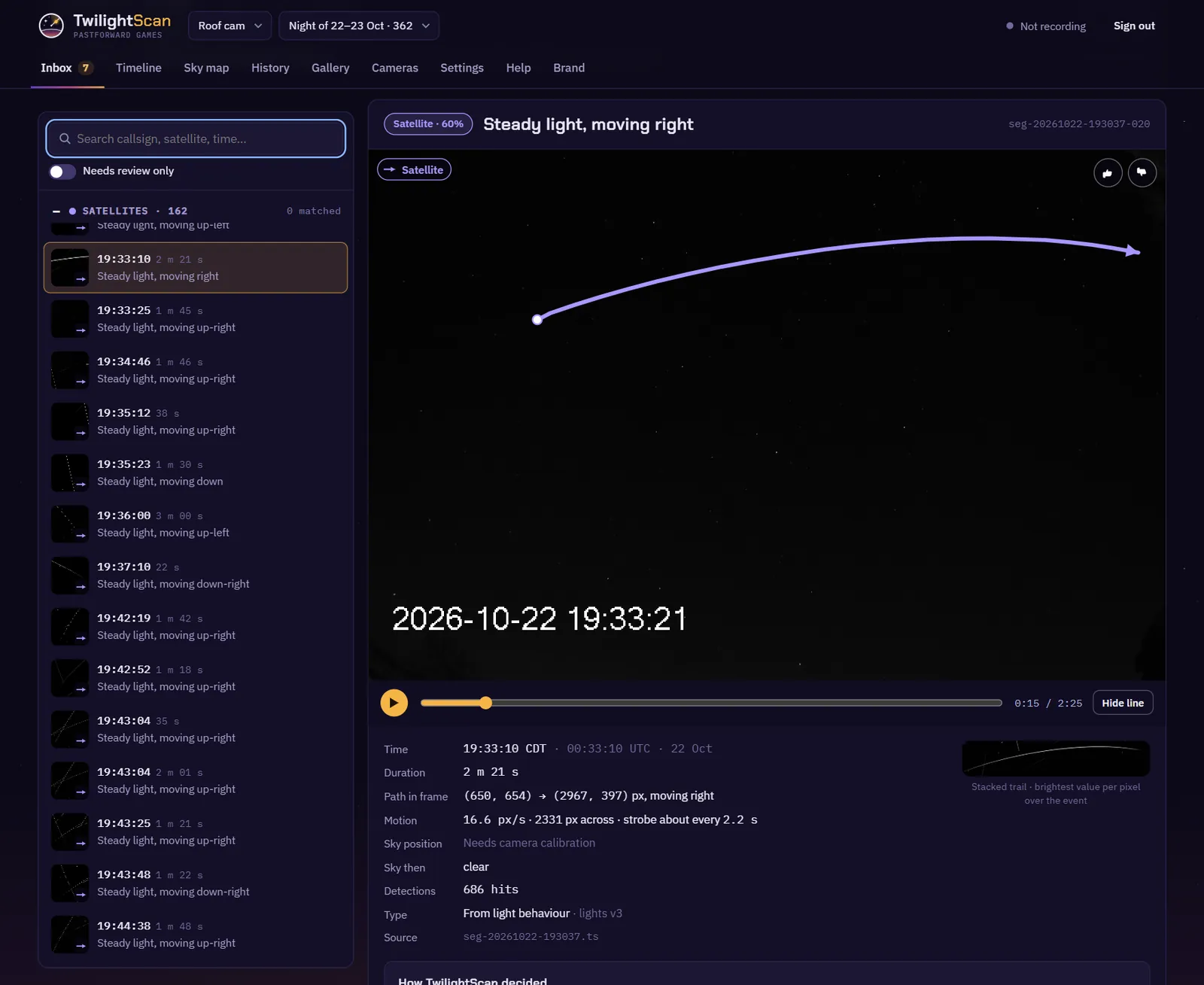
Click a row to open it. At the top is the type and how sure the desk is, for example "Meteor · 80%". The clip plays with the path drawn on it. "Hide line" turns the line off so you can see the light itself. Space plays and pauses.
Under the clip:
- Time in your time zone and in UTC.
- Duration: how long it was in view.
- Path in frame: where it started and ended, in camera pixels, and which way it moved.
- Motion: speed in pixels per second, how far it went, and how often it flashed if it had a strobe.
- Sky position: "Needs camera calibration" until the camera is lined up with the stars.
- Sky then: whether the sky was clear at that moment.
- Detections: how many times the detector saw it.
- Type: "From light behaviour" if the desk chose it, "Set by you" if you changed it.
- Source: the 10-minute video file it came from.
Why it was called this
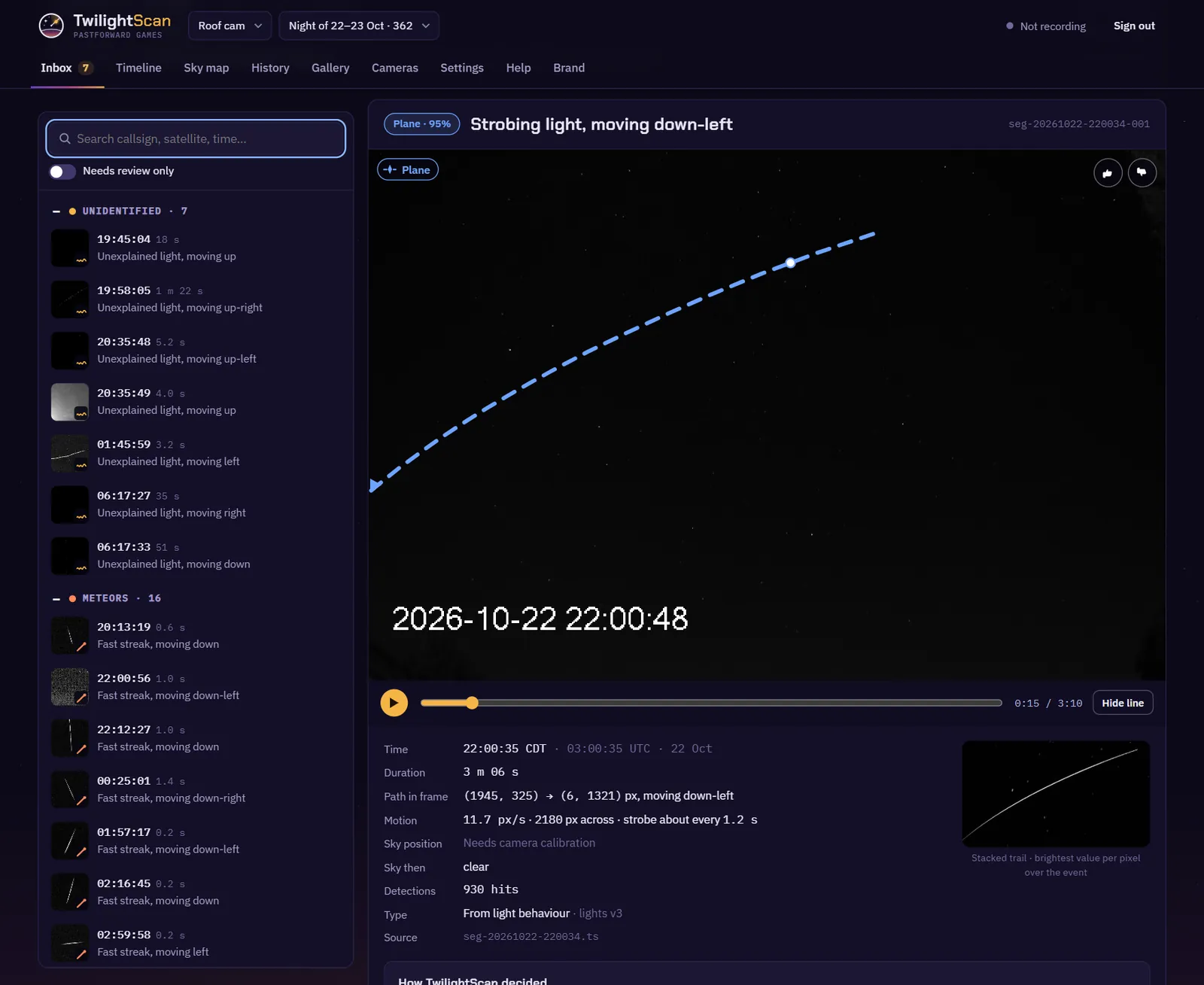
Below the facts is "How TwilightScan decided". Each line is one reason, with a mark: a tick if it fits, a cross if it rules a type out, and a question mark if the check is not possible yet.
- A plane: "Strobe: flashes about every 1.2 s, like aircraft anti-collision lights".
- A satellite: "Steady light, straight path, constant speed, no strobes".
- A meteor: "Straight trail", with how far it is from a straight line, and "Meteor-like": short and fast.
Names come later. "Catalogue check: Satellite matching needs camera calibration" and "Flight check: Flight matching (ADS-B) is not set up yet" are the question marks you will see today.
For an unidentified light the box is called "Why nothing explains it", and it lists which types were ruled out and why.
Review
The buttons are below the reasons. You do not have to review anything. The clip stays either way.
- Like (key C): the type is right. The row gets a tick.
- Dislike, then Bug: an insect or junk. It is marked as noise.
- Dislike, then Wrong category, or Relabel: pick the right type. The type then says "Set by you".
- Mark as noise (key N). Restore undoes it.
- Star (key S): keep it handy. Starred rows show a star in the list.
- Your note: type anything, like what you saw by eye. It saves on its own.
- Copy summary: one line with the type, time, duration and event ID, to paste anywhere.
J and K (or the arrow keys) move up and down the list. Your review is saved on the recorder, so it is the same in every browser.
Needs review only, above the list, hides what you have reviewed. It shows the unidentified lights, the meteors, and anything the desk was less than 60% sure of. The search box matches the description, the time, the type and the event ID.
Timeline
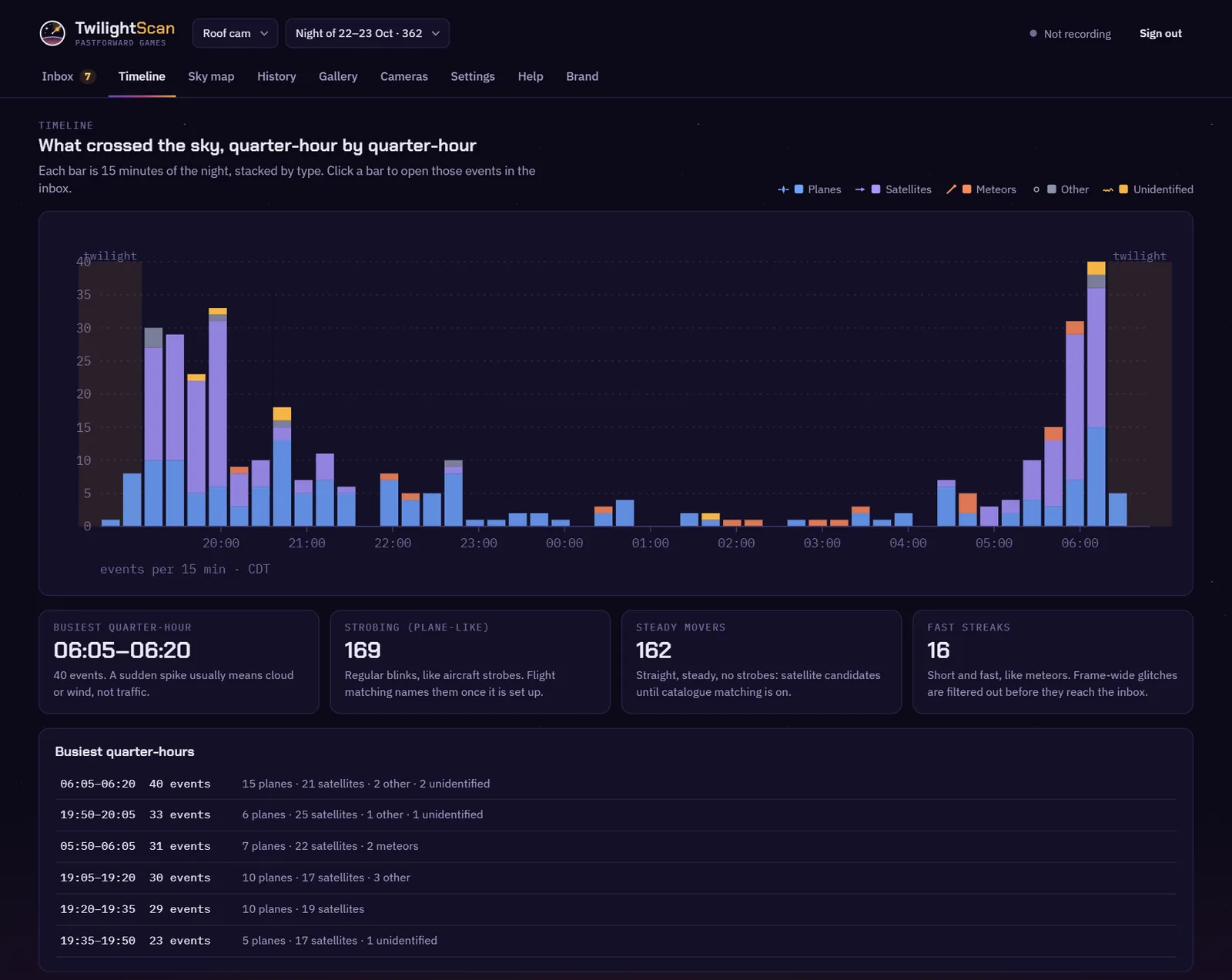
The whole night, dusk to dawn. Each bar is 15 minutes, stacked by type. Twilight and cloudy stretches are shaded. Click a bar to open those 15 minutes in the inbox. A time chip appears above the list; click its × to see the whole night again.
Under the chart are the busiest quarter-hour and the counts of strobing lights, steady movers and fast streaks. A sudden spike is usually cloud or wind, not traffic. The busiest quarter-hours are listed at the bottom, and they open in the inbox too.
Sky map
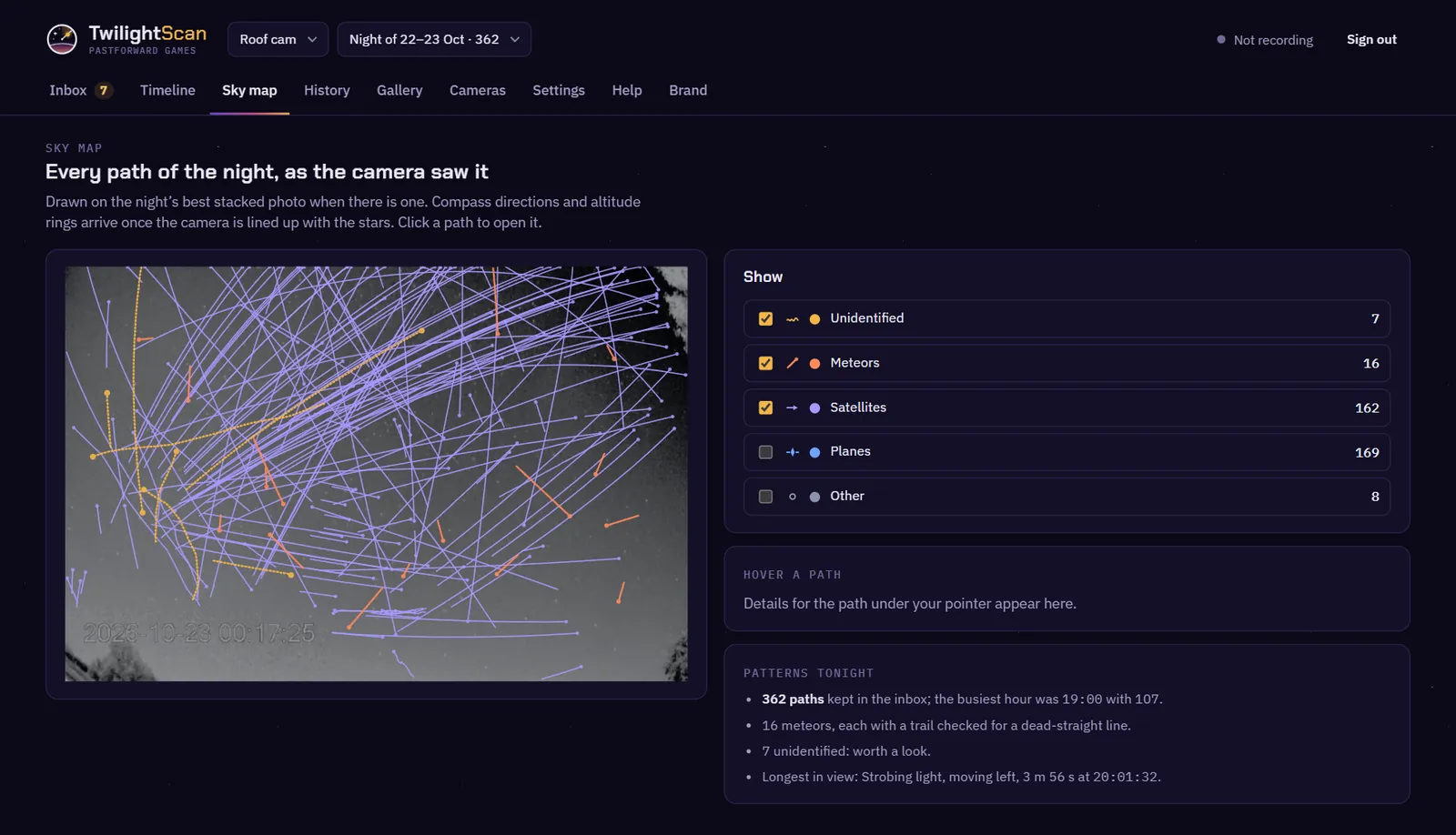
Every path of the night, drawn on the night's best stacked photo. It is the camera's own view. Compass directions and altitude rings come once the camera is lined up with the stars.
Use the boxes on the right to show or hide each type. Planes and Other start hidden, because a night of planes covers everything else. Hover a path to see what it was. Click it to open it in the inbox. "Patterns tonight" sums up the night.
Gallery
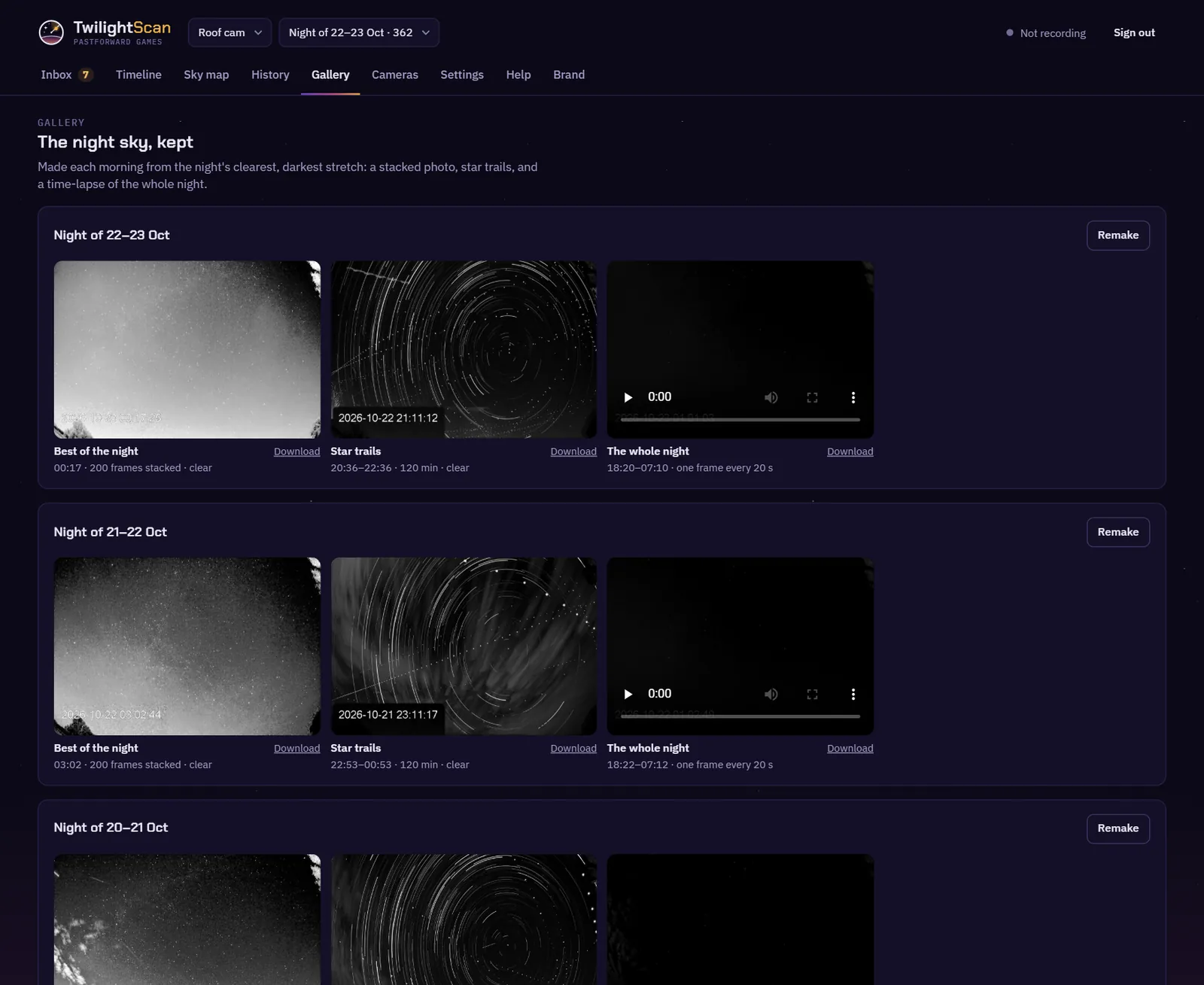
Each morning, after the full pass over the night, the recorder makes three things:
- Best of the night: about 40 seconds of frames stacked at the night's clearest, darkest moment. It shows far more stars than one frame.
- Star trails: the longest clear stretch, up to two hours, stacked into one picture. The stars draw arcs around the pole star.
- The whole night: a time-lapse from dusk to dawn, one frame every 20 seconds.
Click a picture to open it full size, or use Download. Each night has a Remake button. It takes a few minutes. A night with no pictures yet has Make now instead.
History
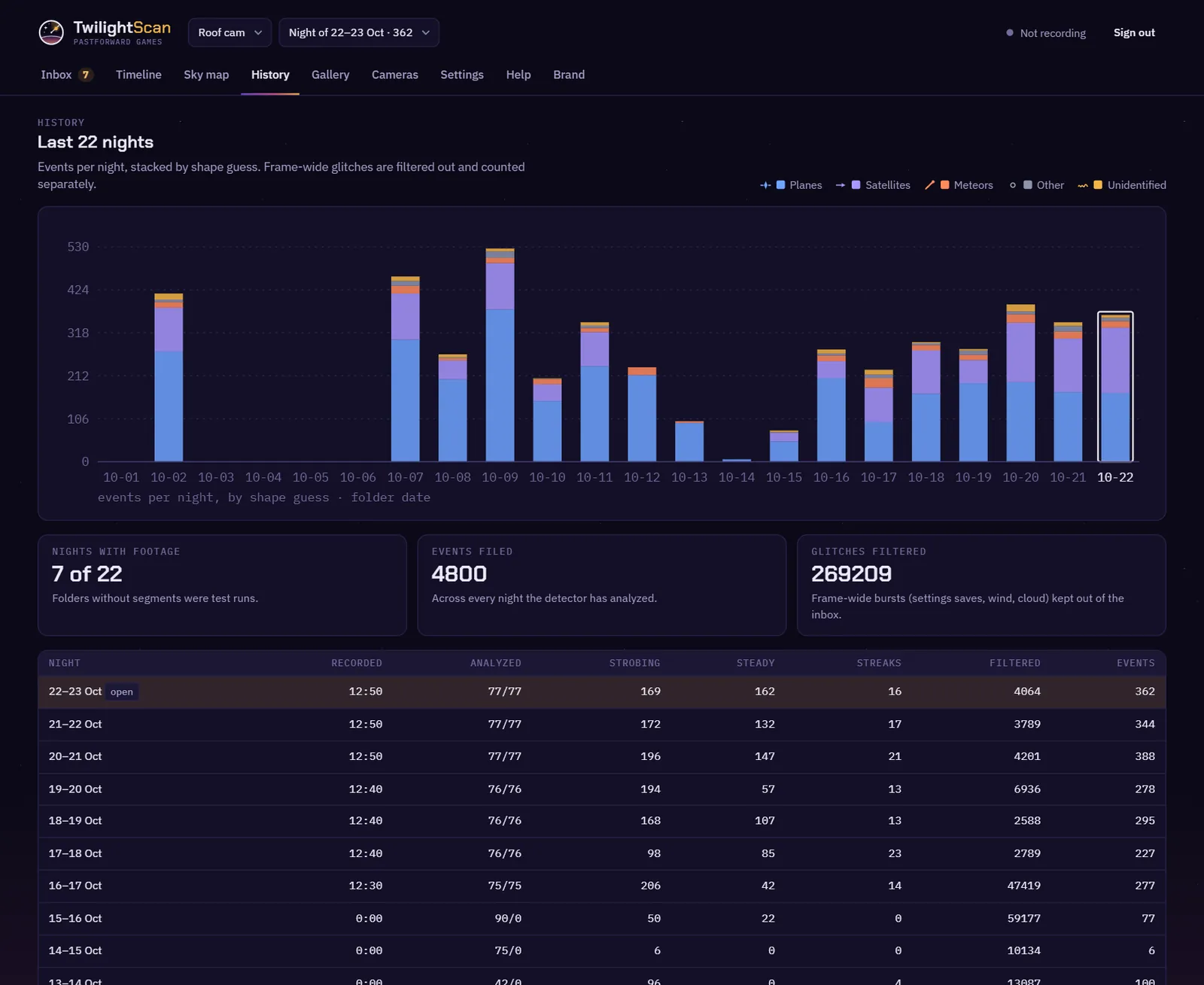
One bar per night, stacked by type. A night is named by its evening's date. The night you have open has a white outline.
The table has, for each night: hours recorded, how many 10-minute segments were analyzed, the strobing, steady and streak counts, how many glitches were filtered out, and the events kept. Glitches are frame-wide flickers, like wind, cloud or a camera settings change. They never reach the inbox. Click a row to open that night in the inbox.
Settings
Settings has three parts today.
- Location and camera: a button to the Cameras tab. Where the camera is and which way it faces are set there. Dusk, dawn and the night's satellite passes are worked out from them.
- Email: the mail server, your sign-in and an app password, and who gets the mail. Choose the morning report, an alert if the camera is offline for 10 minutes while it should be recording, disk nearly full, and camera moved. Send test email checks it. Gmail needs 2-step verification and an app password, not your normal password.
- Security: download the recorder's own certificate and install it once on each device, so the browser stops warning. Change the desk password here, 10 characters or more. Changing it signs out every other browser.
Help
Help has links to these docs and shows the recorder's version. Below that is a form to send a ticket: your email, what kind of problem, a subject and what happened.
The ticket also carries the recorder version, the camera's latest health check, and the last 200 lines of the newest night's recorder log. Before they leave the house, the camera password, user and address, other local network addresses, stream links, your latitude and longitude, and email addresses are removed from those lines.
The reply comes to the email you typed. You can also write from the support page.